Owner
Everything, including money and who is on the team.
The whole thing, in the order it happens, with the numbers we can be held to. We look at every application ourselves within 24 hours, and we set your week up for you. hoppir opens to members on 10 November.
Fourteen steps, in the order they happen, with the numbers we can be held to. The only turnaround we promise is how soon we look at your application.
Four steps in one sitting: how you take bookings today; your studio, with the pin dragged onto the door members actually walk through; your details; then check and send. It costs nothing.
4 stepsA person reads every application, and our answer comes by email to the address you gave us.
we look at every application within 24 hoursWe create your studio and your first venue from exactly what you sent (the address, the map pin and your own directions to the door) and email you your next steps, with one button that opens your studio. Nothing is visible to members yet.
Pin your front door. Add who teaches. Get your classes on hoppir. How we reach you. Your logo and cover photo. Your application usually does “Pin your front door” and “How we reach you” for you. Each step saves on its own, so you can stop halfway and come back.
5 steps, each saves on its ownYou connect what you already run: a Google or Apple Calendar, a calendar link your system publishes, your teachers' own Mindbody links, or the booking page your members use. We only ever look at it, the way a member would, and never change anything in it. Wix is the one exception. Install the hoppir app on your Wix site from Add classes. hoppir reads your classes from Wix, and a hoppir booking lands in your own Wix calendar, so your own seat count stays right. Nothing to paste and nothing to keep in step. Running nothing at all? hoppir is your booking system: paste the week you already send on WhatsApp, or send a photo of your book, and your Schedule keeps it from then on. Your system is in the table below.
a calendar, a page, the Wix app, or the week you already sendPrice each class at what it already costs to book with you: your drop-in or online price, in credits, and most Cape Town classes land between 20 and 30. We are not asking you to undercut yourself and we never add anything on top. Then tell us the most we may sell in that class, not your room size, so the rest of the room stays yours. If hoppir is your booking system, tell us your whole room instead: your own members book from the same seats.
seats 1–200 per classYour classes appear on your Classes screen with their times and teachers, and you price any class that has no price yet. Nothing is bookable early, because hoppir opens to members on 10 November. After that hoppir follows your changes: a change to a class nobody has booked goes through by itself, and you see it on your Schedule for a week in case you want it back. A change to a class somebody has booked waits for you.
bookable 1–12 weeks aheadhoppir opens to members on 10 November, and your classes are in the app from the day we switch you on. You get a roster per class with each booking's check-in code and one-tap attendance, and waitlists that promote themselves.
We make it, we pay for it, we ship it. We order your hoppir check-in stand the day you are approved, when your venue is created, and check-in works from then. It carries your venue's QR and its short code, and your team scans nothing, installs nothing and orders nothing.
one per venue, ordered the day you are approvedMembers scan your stand and hold up a green screen. It is your register, and it has no bearing on what you are paid.
A confirmed booking pays you whether the member attends, no-shows or cancels late. A cancellation more than 24 hours out releases the seat and pays nothing.
24 hours, flat, at every studioA month closes on its last day, we cut your statement in the first days of the month after, and we pay against it by the 7th in a single bank transfer. Every line is itemised down to the booking that earned it, and exports as a CSV.
20% flat · R8 a credit · paid by the 7thOwner, manager and front desk, so everyone sees what their job needs and only owners see the money. Everyone signs in with a six-digit code we email them, or a password if they prefer. A teacher you add does not get a login.
3 rolesThere is a support thread in your portal, and a person here answers it.
The thing studios hate about a marketplace is the second admin, every timetable change typed in twice, forever. So you connect what you already run, and hoppir looks at it the way a member would. We never sign in as you and never change anything in it. Wix is the one exception, because there you install the hoppir app and it puts each hoppir booking into your own Wix calendar.
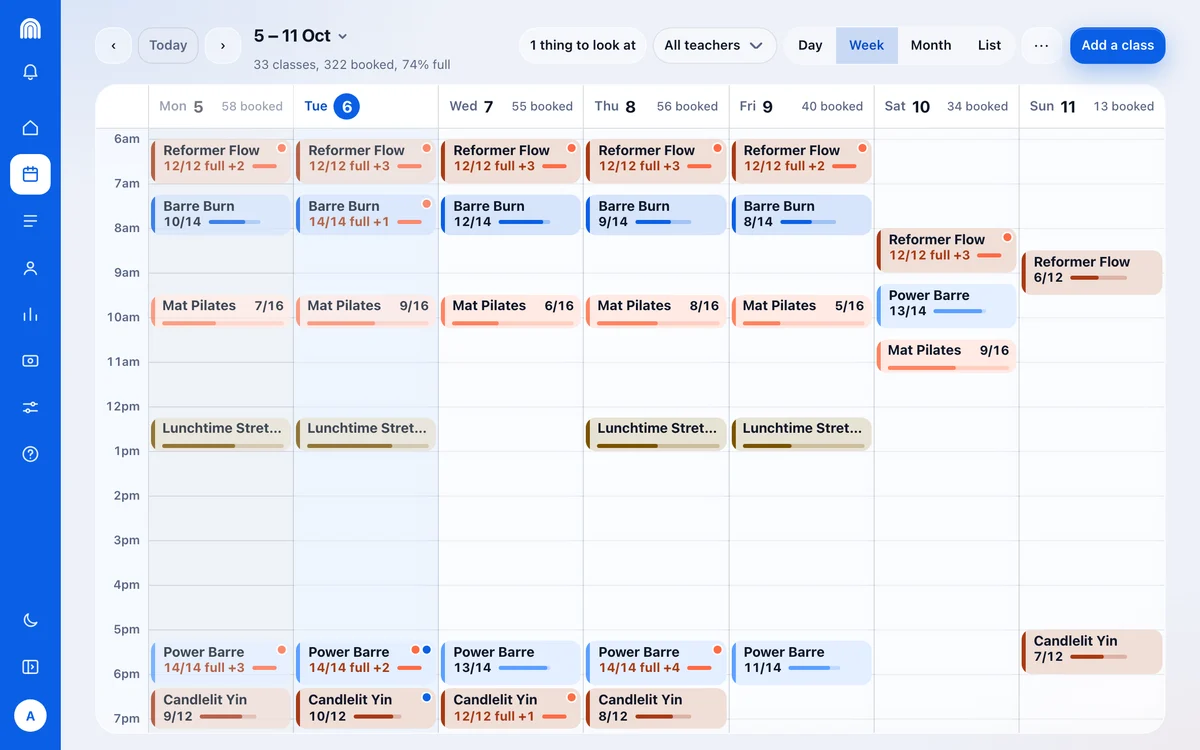
Add a class, move a class, change the teacher, and hoppir follows through the day. A change to a class nobody has booked goes through by itself, and a change to a class somebody has booked waits for you. Everything that changed shows on your Schedule for a week, so you can put any of it back. Nobody types anything twice.
| You run | What you do | What you get |
|---|---|---|
| Glofox | Open your Glofox portal on the schedule screen, copy the whole address, paste it, tick the box. | We check the same class list your members see, every half hour or so, and keep your hoppir week matching it. We never sign in as you. A class your members have booked is never moved or taken away without you. |
| Mindbody | Each teacher opens the Mindbody Business app, then More, Settings, Export My Schedule, and copies the link. One link per person, per location. | We follow your classes from then on. It has to be a staff login, we only bring across classes you have already added, and we never read appointments, so nothing about a client reaches hoppir. |
| Bookamat or Momence | Turn on the Google Calendar sync your system already has, then share that calendar with us. | We check it every half hour or so. We only see what is on that calendar, so make sure every class and every location is on it. |
| Punchpass, TeamUp, Acuity or Squarespace Scheduling | Paste the calendar or subscribe link your system publishes. | We follow it from then on. One thing to check on Acuity: the link can leave out classes nobody has booked yet, exactly the ones you joined hoppir to fill, so compare what comes across against your own week. |
| Google Calendar, Apple Calendar or another calendar | Share your Google Calendar with us, or paste your other calendar's link, on Add classes. | We follow it from then on. A calendar names no teacher and carries no seats, so you say what a class costs and who teaches it once, as its classes first come across, and you set how many seats hoppir may sell. |
| Wix Bookings | Install the hoppir app on your Wix site from Add classes. | hoppir reads your classes from Wix, and a hoppir booking lands in your own Wix calendar, so your own seat count stays right. Nothing to paste and nothing to keep in step. |
| A booking page anyone can open | Paste the page your members already book on. | We read it a few times a day and keep your hoppir week matched, with everything we changed listed on your Schedule for a week so you can put any of it back, and anything touching a class a member has booked held for you instead. Three things to know: the timetable has to be in the page itself, the page has to open without signing in, and a page cannot tell us how many seats are left, so you set that. |
| Nothing at all: WhatsApp, a spreadsheet or paper | Paste the week you already send on WhatsApp, or send a photo of your book, on Add classes. Or tap a time on your Schedule and fill the class in. Either way it repeats until you stop it. | hoppir is your booking system, so there is nothing to keep in step. Members book the week you put up, you see who is coming, and we roll it forward for you. |
| A PDF or a photo of the timetable | Upload it in Add classes: a photo of the wall, a screenshot, or the PDF itself. | hoppir reads the file and shows you every class it found, to check and correct before anything goes up, and nothing is bookable until you save it. If reading pictures is switched off, the screen says so and asks you to type your week in instead, or send us the picture from Help. |
| Booklink | Send us your week and we will set it up with you. | Booklink does not publish your timetable anywhere we can read, and its only calendar holds confirmed bookings rather than your week, so an empty class never reaches it. We would rather say so than promise a read. |
| Something else | Tell us what you run. | If your system publishes a calendar or subscribe link, paste it and we are done. If your schedule is on a page anyone can open, paste that. If neither, we will set you up personally. |
Your roster shows who is booked and the check-in code on each booking, and you mark attendance with one tap: one member, or the whole class at once.
Enough to run the class, and nothing you didn’t need.
A printed hoppir stand goes on your reception counter. Members open their booking, tap Check in and point their own camera at it, or type the short code on it. Their screen goes green, and that is what they show your desk.
Nothing for your team to scan, install, print or tick off a paper list, and no hardware and no app at your end. One stand per venue, ordered the day you are approved, and check-in works from that moment too, so you are never waiting on a courier to take your first booking.
Every partner gets the hoppir studio portal, and it costs nothing to use: no cost to list and no monthly fee, because hoppir earns its flat 20% on the bookings it brings you and nothing otherwise. The class you publish in the portal is the same class members book in the app: one schedule, one system, nothing to keep in step by hand. The same week is in the hoppir studio app on your phone.
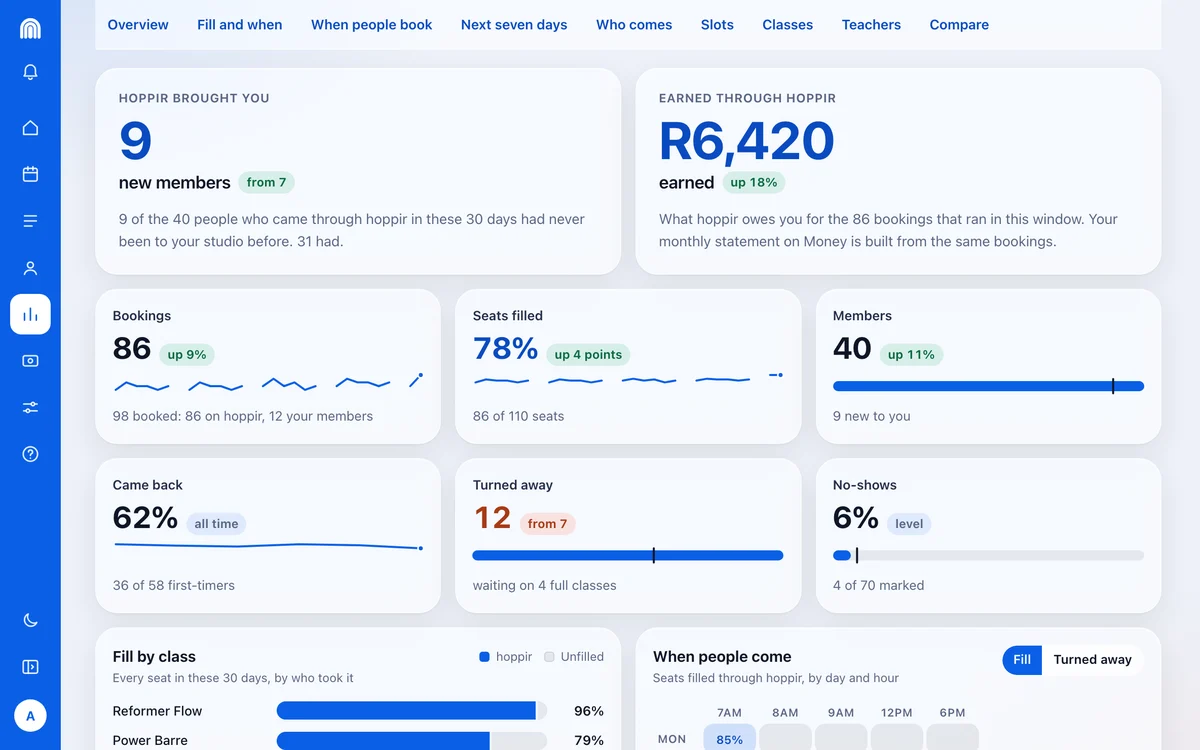
Sign in with a six-digit code we email you, or set a password if you prefer. Give your team owner, manager or front-desk access. A number only shows once there are enough bookings behind it to mean something.
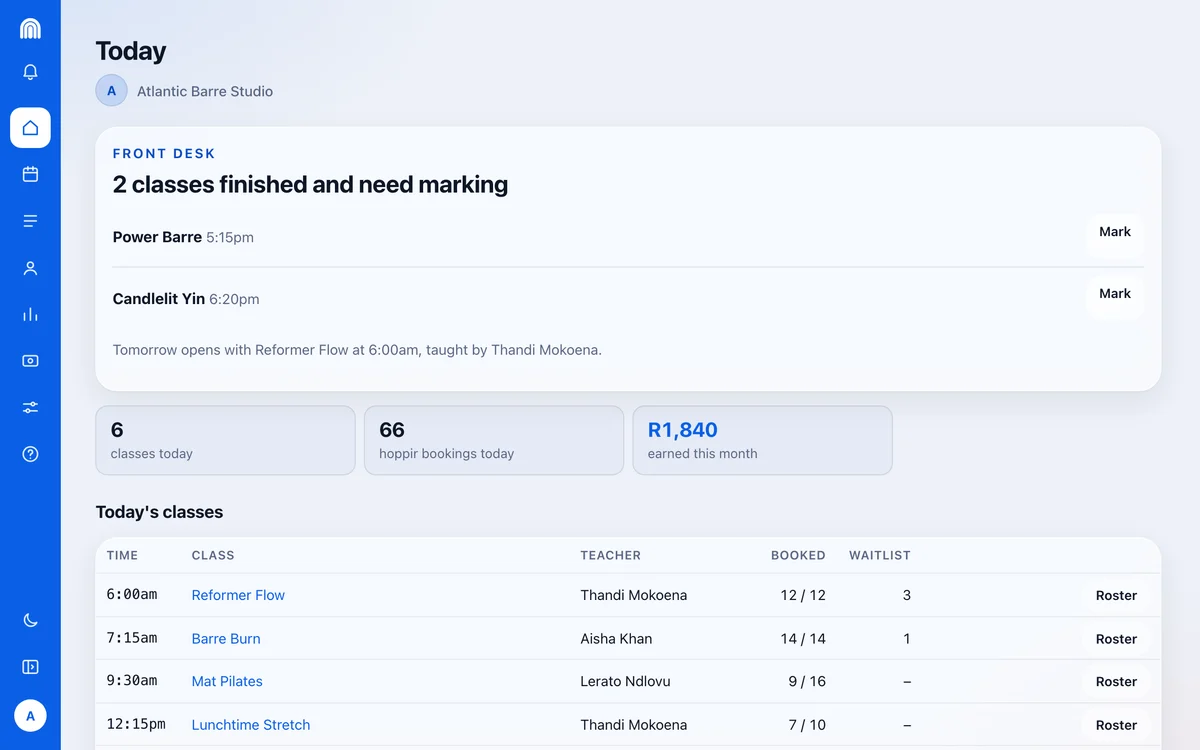
Today on studio.hoppir.app: every class of the day, how full it is, who is waiting and which rosters are still to mark. The figures are a sample studio's.
A flat 20% of the credit value, so a class priced at 25 credits lists at R250 and pays you R200. A confirmed booking pays you whether the member attends, no-shows or cancels late. Only a cancellation more than 24 hours out releases the seat, and that one pays nothing. Check-in is your register; it is not a payment condition, so there is no attendance to police.
Your statement shows what we paid you and for which bookings. It is not a tax invoice. hoppir is not currently a VAT vendor; if that changes the fee becomes 20% plus VAT, 23% including VAT at today’s rate, on 30 days’ notice.
A month runs on the calendar, South African time. Until it closes, Money shows a running total rather than a final one.
Nothing new lands in the month after it closes, and the statement is your final figure.
By bank transfer, against that statement. The payment date and reference appear on Money against the month they settle.
Once a statement is cut it is final: if we refund a member after that, we absorb it and what you are paid never moves.
Add whoever helps you run the place and give each of them a role, so everyone sees what their job needs and nothing more. They sign in with a six-digit code we email them, or a password if they prefer. There is nothing else to set up.
Everything, including money and who is on the team.
The schedule, rosters, and front-desk staff. Not money.
Rosters and attendance. Nothing else.
And when you need us: there is a support thread in your portal, and a person here answers it. Running nothing yet? Paste the week you already send on WhatsApp, or send a photo of your book, and we put it up for you to check.
No, that is the point. Most studios connect something they already have: a Google or Apple Calendar, the calendar link Punchpass, TeamUp or Acuity publishes, your teachers' own Mindbody links, your Glofox branch page, or just the booking page your members already use. Connect it once and hoppir re-reads it through the day and keeps your hoppir week matched to it, holding back anything that touches a class a member has booked and listing everything it did change on your Schedule for a week. If you run nothing at all, and that is the biggest group in Cape Town, there is no second place to keep: hoppir is your booking system. Paste the week you already send on WhatsApp, or send a photo of your book, and it lives on your Schedule from then on.
Yes, and that is the easiest way to join: there is nothing to connect and nothing to keep in step. The quickest way in is the week you already send on WhatsApp: paste it, or send a photo of your book, and hoppir reads it into classes you check before they go up, each with its name, who teaches it, its seats and what it costs in credits. From then on your week lives on your Schedule and repeats every week until you stop it, and we roll it forward so it does not run out while you are away. From there members book, you see who is coming on the day's roster, check-in happens at your own door on a stand we make and ship, and we pay you in one transfer by the 7th of the following month. Your seats are your whole room: you tell us how many people fit, and hoppir members and your own members book from those same seats. If you do already keep your week in Google Calendar or Apple Calendar, connect that instead and hoppir follows it from then on. Either way in, hoppir opens to members on 10 November, and nothing of yours shows until we switch you on.
You do, class by class. You set what each class costs in credits and can change it on your Classes page whenever you like: a busy Saturday reformer and a quiet Tuesday mat class do not have to cost the same. What we ask is that it matches what the class already costs to book with you: your drop-in or online price, in credits, rounding down where it falls between two. Members compare, so a class that costs more here than at your own door does not get booked, and we are not asking you to undercut yourself either. hoppir never adds a margin on top of your number, and a member sees the exact cost on the class before they book.
No. hoppir opens to members on 10 November, and nothing of yours is bookable until we switch you on. Connecting brings your classes onto your Classes screen with their times and teachers, and a class with no price yet waits for you to price it. After that hoppir follows your changes. A change to a class nobody has booked goes through by itself, and your Schedule shows it for seven days so you can put it back. A change to a class somebody has booked waits for you to say yes. Would rather say yes to every change? Turn on Hold every change for me on Add classes.
No. There is no exclusivity. hoppir is built to run alongside your own memberships and drop-ins: it is there to fill what is left over, not to take over. You keep your own app, your own prices and your own members, and you decide how many seats in each class we may sell.
Nothing to list, and no monthly fee. hoppir takes a flat 20% of the credit value of every booking that comes through us and nothing else, so we only earn when we bring you someone, and a no-show still pays you. hoppir is not currently a VAT vendor; if that changes the fee becomes 20% plus VAT, 23% including VAT at today's rate, on 30 days' notice.
Each person gets one of three roles, so they see what their job needs and nothing more. An owner sees everything, including the money and the team. A manager runs the schedule, the rosters and the front desk, but never sees the money. The front desk sees rosters and attendance, and nothing else. Everyone signs in with a six-digit code we email them, or a password if they prefer. Adding a teacher does not give them a login.
hoppir isn’t open to members yet; the founding studios are onboarding now. Apply in one sitting, and we will come back to you with what your schedule could look like on hoppir. No obligation either way.
Apply at studio.hoppir.app