Bookings, payments, no-shows and the empty seats in your quiet slots, handled. hoppir puts your classes in front of people across Cape Town, members and visitors alike, and pays you by the 7th.
No joining fee and no monthly fee
20% of a booking's credit value, nothing else
No lock-in and no exclusivity
Works with Wix, Octiv, Glofox and more
No booking system? hoppir is one
hoppir opens to members on 10 November. We’re onboarding the founding studios now.
Apply at studio.hoppir.app. It costs nothing and takes one sitting.
Pick what you run
What do you take bookings on?
The steps are different for each one, and so are the limits. Pick yours and read both before you apply.
hoppir is your booking system, at no cost.
1Apply in one sitting. Paste the week you already send on WhatsApp, or send a photo of your book, and we set it up for you to check.
2Members book and pay in the app. You see who is coming on Today, and an email tells you when someone books.
3Your week repeats on its own, and nobody sees it until we switch you on.
Worth knowing. Your seats are your whole room: hoppir members and your own members book from the same seats, and the desk can seat one of your regulars by name in one press. The member app is on iPhone first.
Bookings land in your own Wix calendar. Nothing is typed twice.
1Apply, then install the hoppir app on your Wix site in one press, from Add classes.
2hoppir reads your classes from Wix Bookings.
3When a member books, the booking is written into your Wix calendar and Wix checks the seat, so your own count stays right.
Worth knowing. Wix Bookings has to be switched on and used for your classes. If your site is on Wix but you take bookings another way, hoppir is your booking system instead.
We read your Octiv timetable. You never type in a booking.
1Apply, then paste your Octiv schedule widget link. It is in Octiv under Settings, then Widgets.
2We open it a few times a day, the way one of your members would. Your classes come across by themselves, and every change is listed on your Schedule for a week so you can put any of it back.
3You choose which classes hoppir may sell, and how many seats. Then lower each class's limit in Octiv by that many, and tell us it's done.
Worth knowing. We read and never write. A hoppir booking shows on your hoppir roster and by email, not in Octiv, so the lower limit is what keeps those seats for hoppir. Start with two seats a class.
Your Bookamat timetable, through the calendar Bookamat already makes.
1Turn on Sync with Google Calendar in Bookamat. It makes one calendar, called Bookamat.
2Share that calendar with hoppir, and paste its Calendar ID on Add classes. We read it and never change it.
3New classes, new teachers and moved classes reach hoppir by themselves.
Worth knowing. A cancellation and your live seat count don't come through. A class you mark private comes through as an ordinary one, so tell us which to take off sale. Cancel on hoppir too, and keep hoppir's seats free in Bookamat yourself. We have asked Bookamat for a proper feed.
Your teachers' calendar links keep hoppir in step.
1Mindbody doesn't let outside apps read a timetable. Each teacher exports a calendar link from the Mindbody Business app instead: More, Settings, Export My Schedule.
2Add your classes on hoppir first, named exactly as they are in Mindbody. Then paste the links in once, and your classes follow.
3In Mindbody, lower each class's capacity by the seats you give hoppir. We never read appointments or client details.
Worth knowing. This is the heaviest setup we have: one link for each teacher at each location, from a staff login. You can start with a few classes listed by hand.
1We read the public timetable your members see, as a guest, once you authorise it.
2We never sign in as you, and nothing changes in Glofox.
3You choose which classes hoppir may sell, and how many seats.
Worth knowing. A hoppir booking shows on your hoppir roster and by email, not in Glofox. Set a small number of seats to start, and keep them free in Glofox yourself.
1Apply, pick your system from the list, and paste the link the form asks for.
2We look at every application ourselves within 24 hours, and we tell you how hoppir keeps in step with it.
3If it can't, you paste your week once or send a photo of your book, and hoppir is your booking system.
Worth knowing. A calendar link your system publishes, a Google or Apple Calendar you already keep, and Punchpass, TeamUp, Acuity and Momence all work today. Nothing is reserved in your own booking system, so keep hoppir's seats free in it yourself.
Wix Bookings, Octiv, Bookamat, Mindbody, Glofox and the other systems named here are trade marks of their owners. hoppir is not affiliated with any of them.
Why join
Being found is only the start.
The rest is everything around a class: the bookings, the payments, the chasing and the counting. hoppir takes it off your hands, so your day goes on the room rather than the laptop.
Fill the quiet slots, leave the full ones alone
Your 6pm sells out. Your Tuesday 2pm doesn't. Give hoppir seats only where you have room, class by class, and change the number whenever you like. A class that is already full can stay off hoppir completely.
Members pay in the app when they book, so there are no EFTs to check, no cash to count and no card machine. A late cancel or a no-show still pays you in full, and one transfer lands by the 7th, itemised down to the booking.
Keep the booking system you already run. hoppir picks up your classes from it and keeps up with your changes by itself. On Wix Bookings, a hoppir booking goes straight into your own Wix calendar.
Send us the week you already post on WhatsApp, or a photo of your book, and we set it up for you to check. It repeats every week on its own, and your own members book the same seats, with nothing charged to them by hoppir.
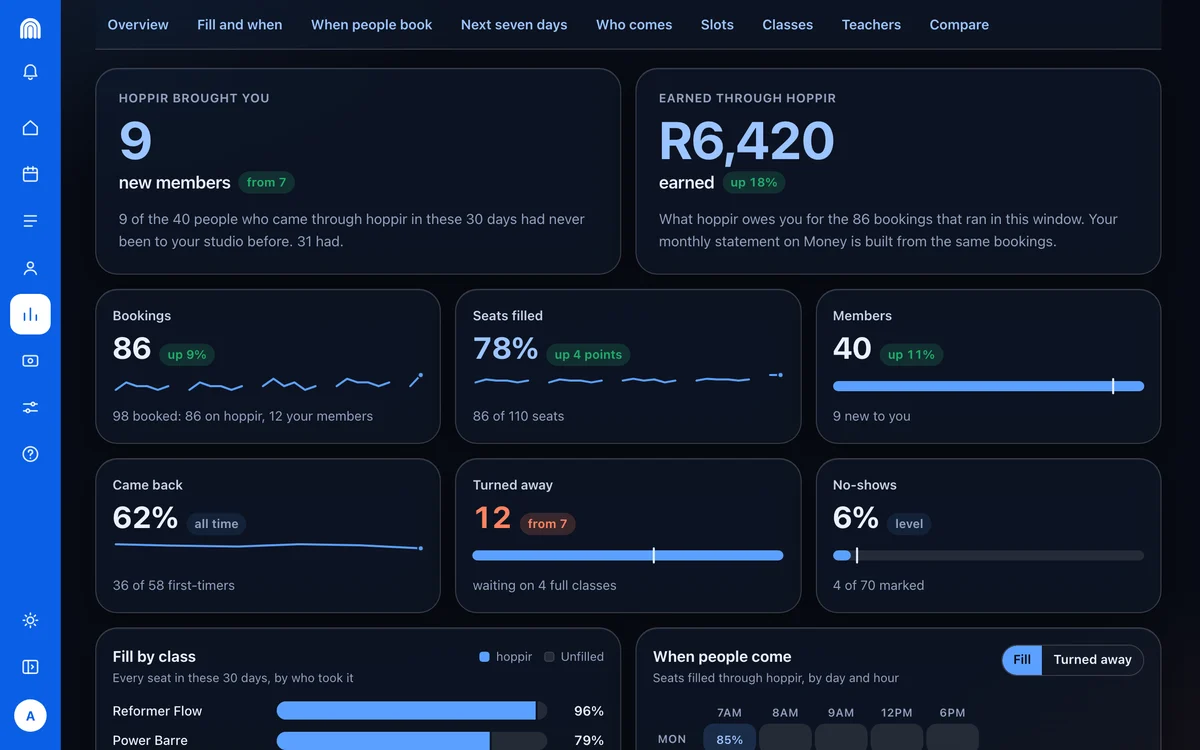
Which slots fill, who came back, how many people a full class turned away, what members say about you and how you compare with similar Cape Town studios. All of it worked out for you, on the desk and on your phone.
People browsing the map, regulars from other disciplines and visitors in town for a week all find you in one place. No listing fee and no ads to run: hoppir earns its 20% only when somebody books.
How it works
Four steps, and none of them is admin.
1
Apply
Four short steps in one sitting: how you take bookings today, your studio with the pin on the door members walk through, your details, then check and send. It costs nothing. We look at every application ourselves within 24 hours, and we set your week up for you.
The system you already run keeps hoppir in step: a Google or Apple Calendar, a calendar link your system publishes, your teachers' own Mindbody links, or the booking page your members use. On Wix you install the hoppir app instead. No system at all? hoppir is your booking system: paste the week you already send, or send a photo of your book. You set what each class costs in credits and how many seats it has.
Your classes appear in the app the day we switch you on. You get a roster per class with each member's check-in code and one-tap attendance, and never their email or their phone. They check themselves in by scanning the stand we make and ship you.
The same 20% for every studio, published rather than negotiated. hoppir is not currently a VAT vendor; if that changes the fee becomes 20% plus VAT, 23% including VAT at today’s rate, on 30 days’ notice. The number and a worked example are on the Terms page of your portal from the day you go live.
The maths
What spare seats are worth.
Every seat hoppir fills is a seat you’d otherwise have sold to nobody.
AboutR8 320extra a month
10 seats × 24 credits × R8 a credit, times 52 weeks over 12
R8 a credit is R10 less hoppir’s flat 20%, the same for every studio. The seats are the only estimate here, and you decide how many you release.
hoppir studio
Your whole studio, in your pocket.
Every studio on hoppir gets the hoppir studio app on your phone, and the portal at studio.hoppir.app for the desk. Both come with your listing, with nothing to buy and no monthly fee. The app tells you what needs you, and the rest looks after itself.
hoppir studionow
Reformer Flow is full
Tomorrow, 06:00· 3 waiting
Add seats
Add a time
It pings you when a class fills.Three people waiting? Add seats or add another time straight from the notification, where the seats are yours to set.
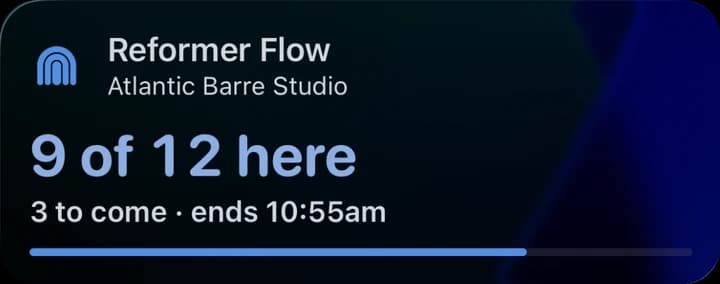
It keeps the class on your Lock Screen.Open the class and, while it runs, your Lock Screen shows how many are here as you mark them in, how many are still to come and when it ends.
Everything else, a tap away.
Your schedule, your rosters, your numbers and your money, laid out so you can read them between classes.
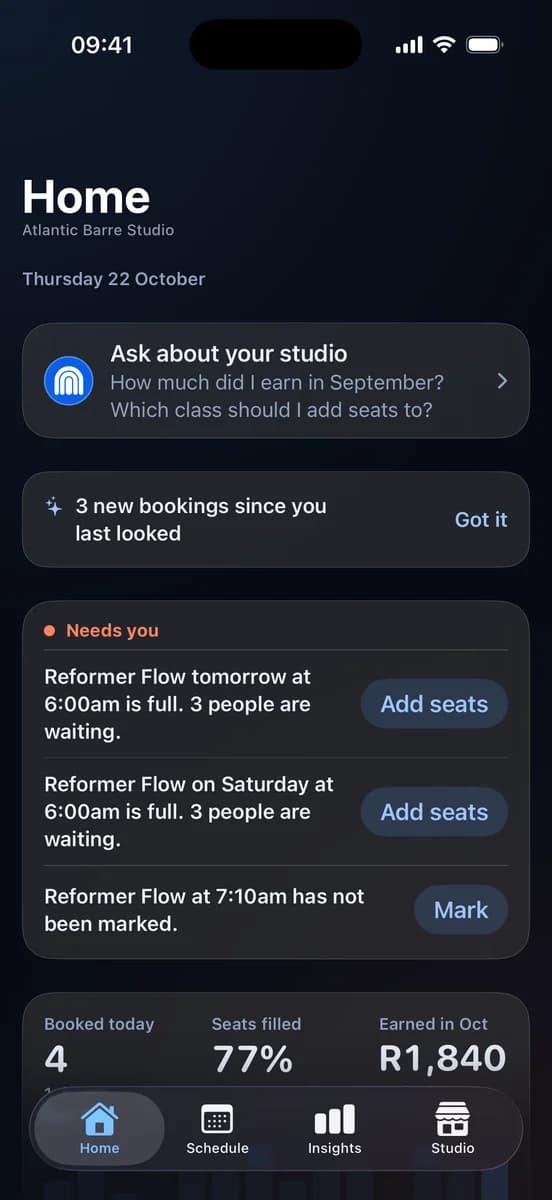
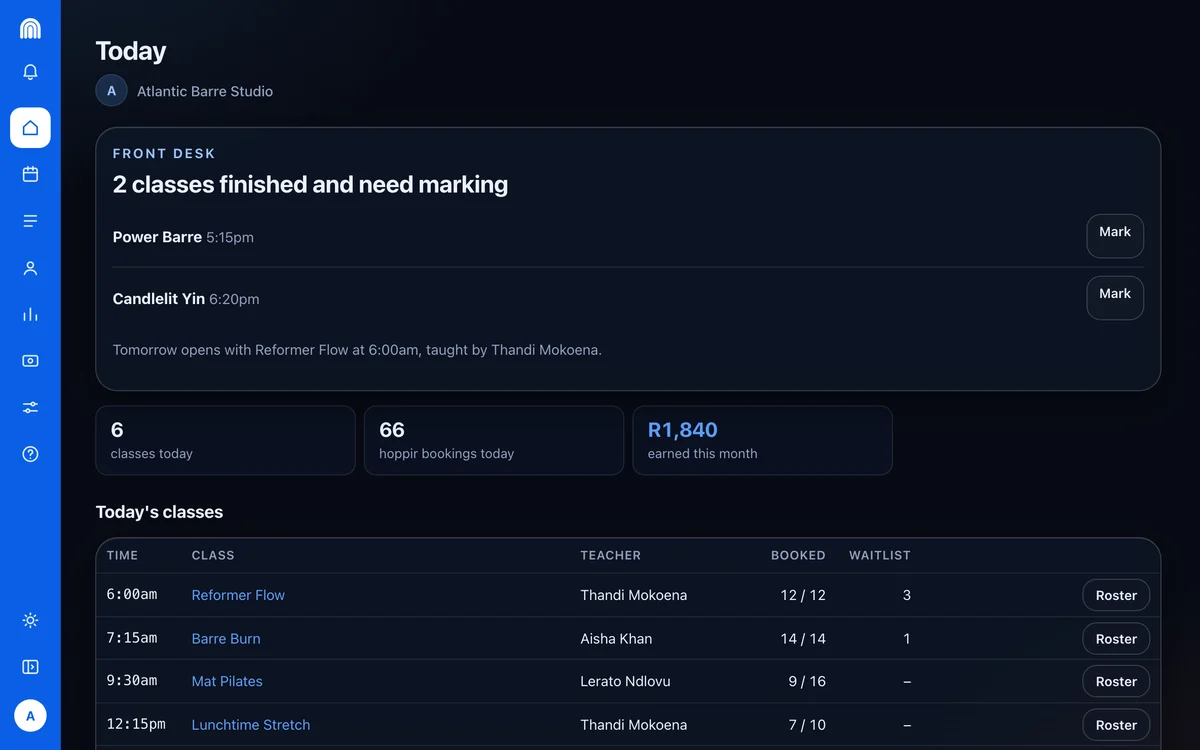
What needs you comes first: a full class with Add seats beside it, a class still to mark. Then today's bookings and what you have earned this month. When nothing needs you, nothing is there.
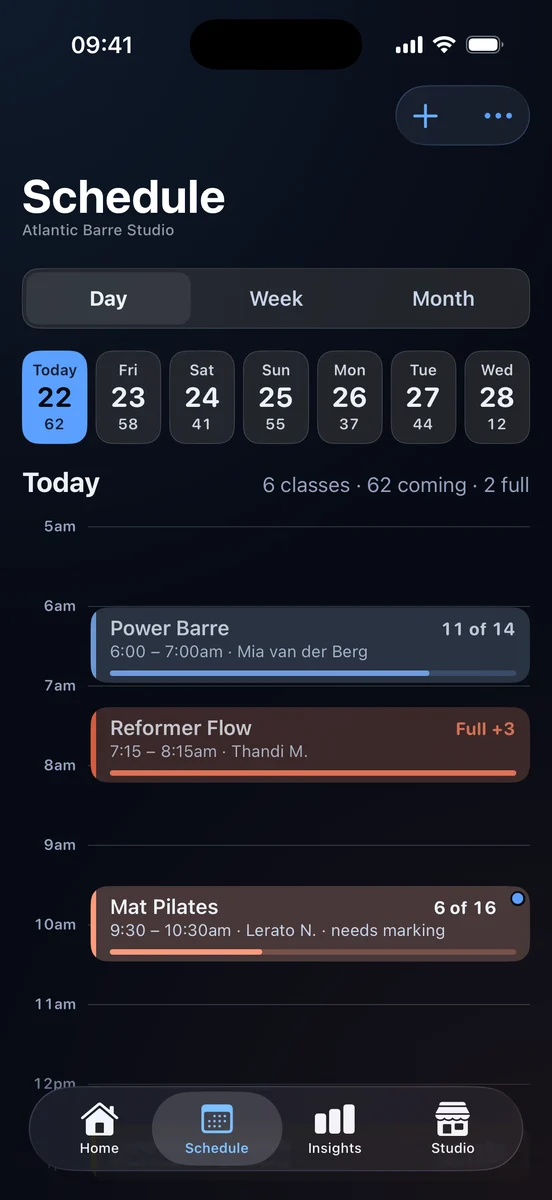
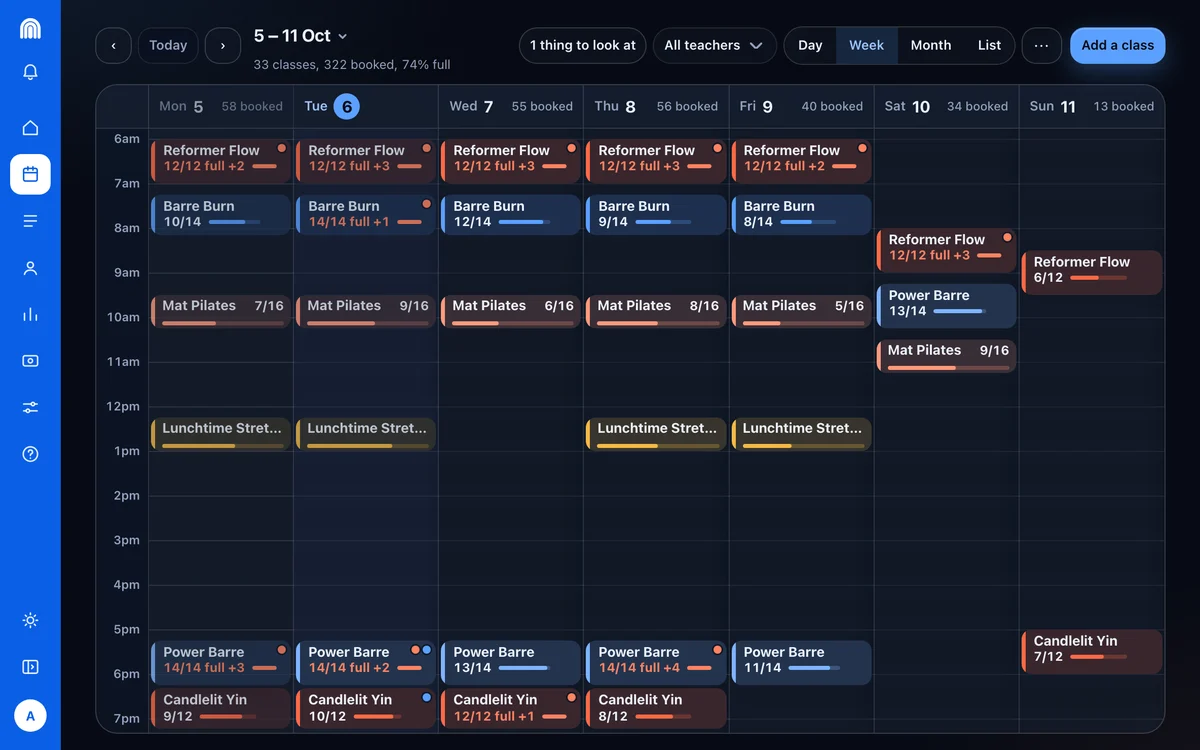
Every class in its own colour, how many are coming and which are full. Swipe through the week ahead, or switch to the week or the month.
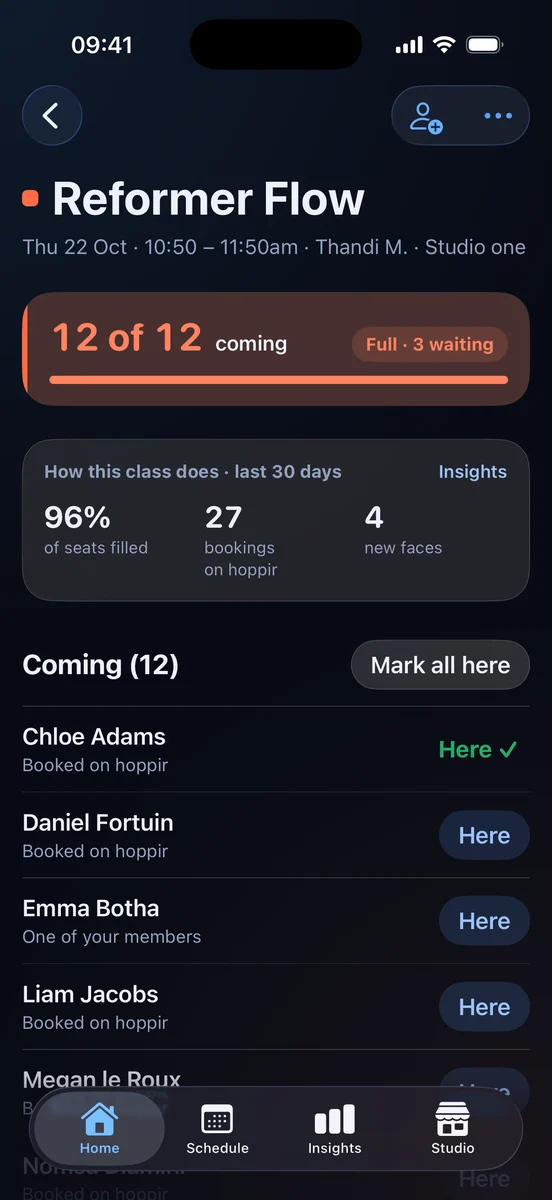
Who is coming, who is waiting and who is one of your own members. Mark the whole room here in one tap, and see how the class has done over the last 30 days.
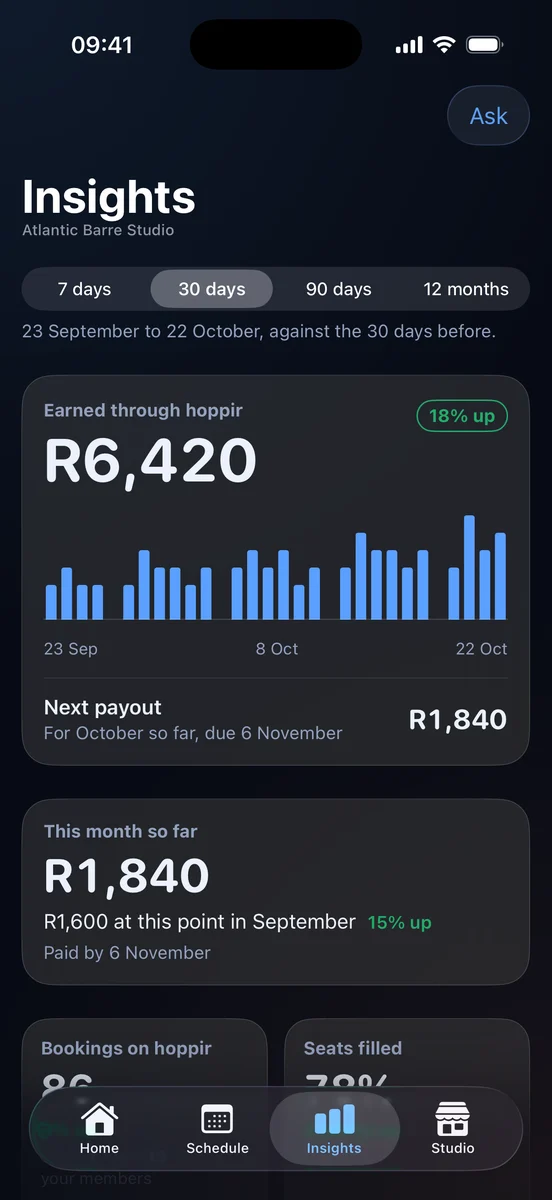
What hoppir earned you, your next payout and when it lands, and this month against the same days last month. Worked out for you, with nothing to add up.
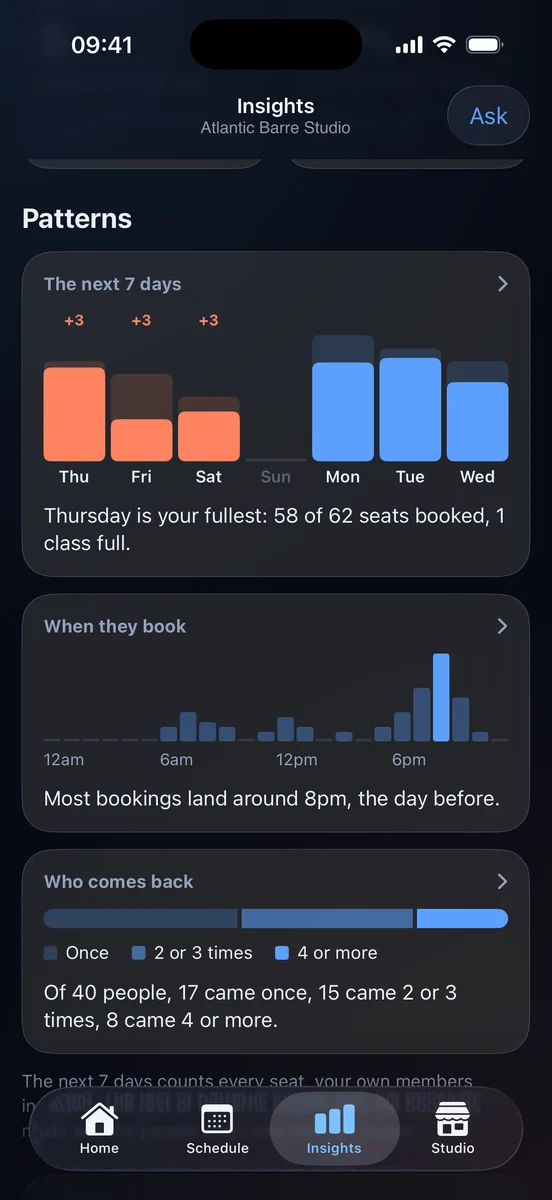
Your fullest day this week, when people book, and how many keep coming back. The things worth knowing before you plan next month.
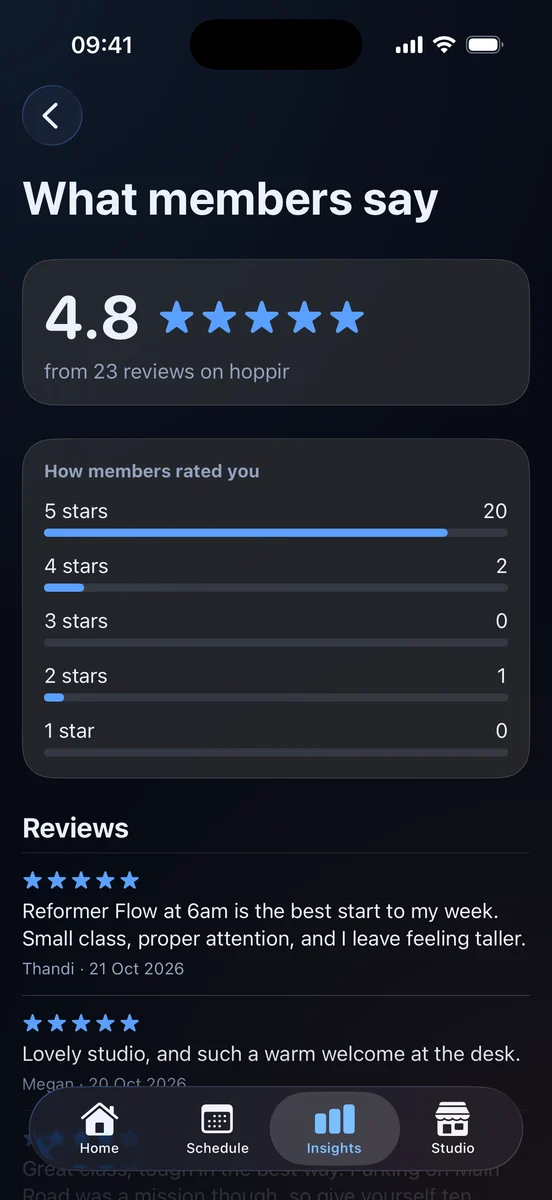
Your rating and every review members leave, and a ping when a new one comes in.
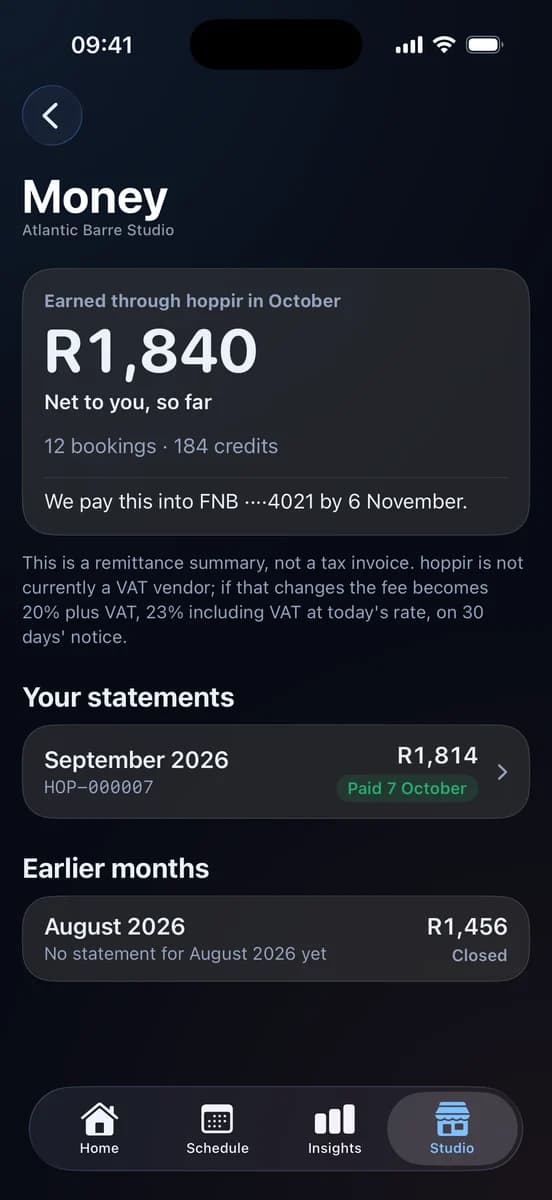
This month so far, every statement, and the day it is paid into your bank. Only the owner sees it.
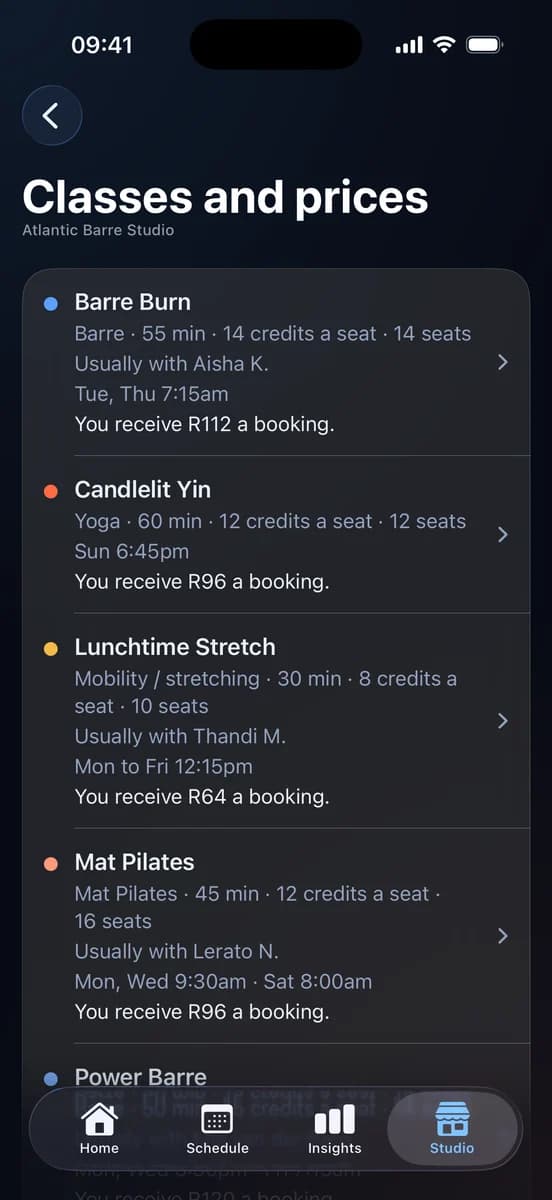
Every class with its price, its seats and its weekly times. Change a price or the seats from your phone, or retire a class you no longer run.
What needs you comes first: a full class with Add seats beside it, a class still to mark. Then today's bookings and what you have earned this month. When nothing needs you, nothing is there.
And studio.hoppir.app for the desk.
The same week, the same colours and the same numbers on a bigger screen, for the jobs you would rather do sitting down: building your timetable, adding a class and reading your statements.
studio.hoppir.app
Today on studio.hoppir.app: every class of the day, how full it is, who is waiting, and the rosters still to mark.
The app and the portal come with every listing. Give your team access as an owner, a manager or the front desk, and only owners see the money.
What stays yours
Your room, your prices, your members.
Your prices
You set what each class costs in credits, class by class, and change it whenever you like. hoppir adds no surge, no booking fee and no margin on top of your number. All we ask is that it matches what the class already costs to book with you: we are not asking you to undercut yourself.
Your seats
You tell us the most we may sell in a class, not how many the room holds. We stop selling at your number, so the rest of the room stays yours for your own members. If hoppir is your booking system, the number is your whole room instead: hoppir members and your own members book from the same seats. Lowering it stops the next sale rather than undoing one: seats already booked stay booked.
Your members
No exclusivity and no lock-in. Keep your own memberships, your own drop-ins, your own app and your own prices. Your roster shows who is booked and their check-in code, and never their email, their phone or where else in the city they train.
The stand is on us
We make the check-in stand, we pay for it and we ship it. One per venue, ordered the day you are approved, with nothing for your team to install, print or scan. Check-in works from that day too, so you are never waiting on a courier to take a booking.
For your coaches
Private sessions that only happen when somebody books.
Publish the times a coach can take a private, and members book them on the spot in the hoppir app. A time nobody books simply passes, so your coach is only there when somebody has booked.
WednesdayPrivate training with Nadia
6:00amOpen for a private6:00am · Nadia
7:00amSam Jones +17:00am · Nadia
8:00amOpen for a private8:00am · Nadia
12:30pmOpen for a private12:30pm · Nadia
Private12 hours’ notice · 1 person R600 · 2 people R900
In the portal, your Schedule shows a time as Open for a private until somebody books it, and then who is coming.
Group class or Private session.In the portal, Add a class asks which. For a private, pick the coach, the days and the start times, and repeat them every week, until a date, or just this once.
Priced by party size.A price for one person, and if you like for two, three or four. One person books for the whole party and pays when they book, not with plan credits.
The notice you need.Choose 2, 6, 12 or 24 hours. Members can’t book inside that window.
You hear at once.By email and in the hoppir studio app, saying who booked, unless you have switched those notices off. If your team uses WhatsApp, a session today or tomorrow is sent there too.
Cancelling, as for any class.The same 24-hour rule applies, and if you cancel, the whole party is refunded. When you publish, we refuse a private time that overlaps another of the same coach’s privates that day.
Running nothing at all
No booking system? hoppir is one.
Paste the week you already send on WhatsApp, or send a photo of your book, and hoppir fills your Schedule for you to check. After that the week repeats on its own. Members book in the app, you see who is coming on Today, and check-in is at your door.
Your seats are your whole room. You tell us how many people fit, and hoppir members and your own members book from those same seats.
Already keep your week in Google Calendar or Apple Calendar? That is its own way in: connect it and hoppir follows it from then on. A calendar has no seats, so how many we may sell is yours to set.
Already on booking software? Keep it, and hoppir fills your empty seats. Don’t have any? hoppir is your booking system.
And nobody sees any of it until you are ready. hoppir opens to members on 10 November, and nothing of yours shows until we switch you on, so the first week you build is yours to change, rearrange or throw away.
Works with what you run
Your schedule stays where it is.
You connect what you already run, and hoppir looks at it the way a member would. We never sign in as you and never change anything in it. Through the day hoppir keeps your week matching, and anything touching a class a member has booked waits for you. On Wix it works the other way round. Install the hoppir app on your Wix site from Add classes. hoppir reads your classes from Wix, and a hoppir booking lands in your own Wix calendar, so your own seat count stays right. Nothing to paste and nothing to keep in step. Running nothing at all? Then hoppir is your booking system. Paste the week you already send on WhatsApp, or send a photo of your book, and it lives on your Schedule from then on.
A flat 20% of the credit value of your class and nothing else: a class priced at 25 credits is listed at R250 and pays you R200. There is no listing fee and no monthly fee, and it is the same 20% for every studio, published rather than negotiated. A month closes on its last day, we cut your statement in the first days of the month after, and we pay against it by the 7th in a single bank transfer, itemised down to the booking that earned it, with a CSV export. hoppir is not currently a VAT vendor; if that changes the fee becomes 20% plus VAT, 23% including VAT at today's rate, on 30 days' notice.
What happens if someone cancels or does not turn up?
Up to 24 hours before the class a member can cancel: they are refunded, the seat goes back on sale, and that booking pays you nothing. Inside 24 hours, or if they simply do not turn up, the seat stays yours and pays you exactly what an attendance does. It is the same 24-hour rule at every studio, and it does not depend on anyone being checked in: check-in is for your register, not for your money.
How many seats do I have to release?
Entirely up to you, class by class. The number is the most hoppir may sell in that class, not how many the room holds, so the rest of the room stays yours for your own members. If hoppir is your booking system, the number is your whole room instead, and hoppir members and your own members book from the same seats. Change it whenever you like: lowering it stops the next sale rather than undoing one, so seats already booked stay booked.
What does my roster show me about a member?
Who is booked, and their check-in code. Never their email, never their phone, never their balance, and never where else they train. You mark attendance with one tap, one member or the whole class at once, and waitlists promote themselves. Enough to run the class, and nothing you did not need.
Is there anything for my team to install?
No hardware, no app and no scanner. A printed hoppir stand goes on your reception counter, and the member points their own camera at it and shows you the green screen it produces. We make the stand, we pay for it and we ship it, one per venue, and there is nothing to order, print or tick off a paper list. Where a stand has not arrived yet, the same check-in works from the short code on the booking.
How long until I am live?
We look at every application ourselves within 24 hours, and we set your week up for you. From there it is a short setup in the portal, five steps that each save on their own. hoppir opens to members on 10 November: finish setup before then and your classes are there from day one.
Everything else people book has one place to book it. Let’s give a class one too.
hoppir isn’t open to members yet; the founding studios are onboarding now. Apply in one sitting and we will come back to you with what your schedule could look like on hoppir. No obligation either way.